
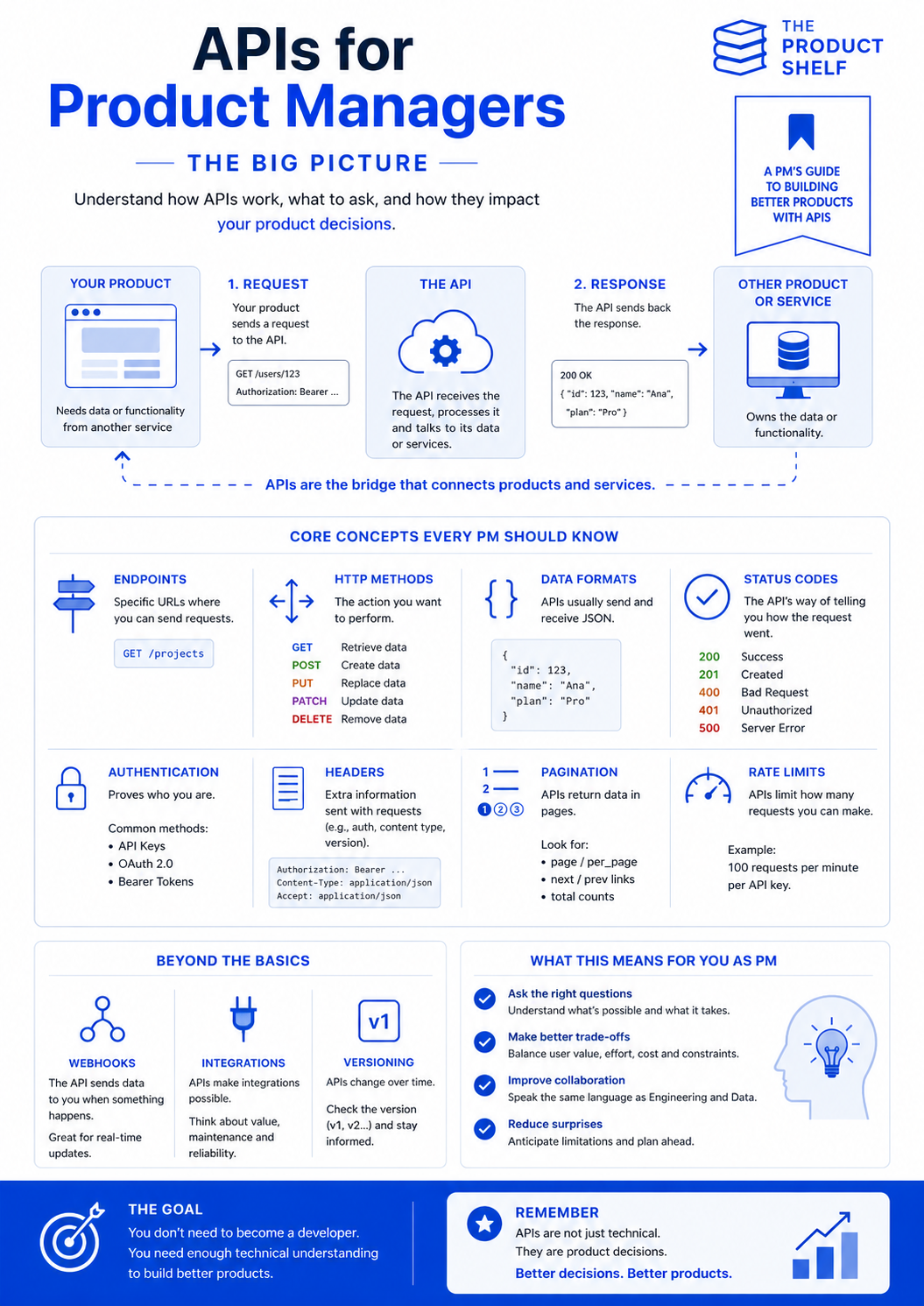
APIs are behind many of the experiences we use every day. They allow applications to retrieve information, send data, process payments, authenticate users and connect with other products and services.
When a weather application displays the current forecast, an online store checks the status of a payment or a travel platform shows available hotels, an API is often working in the background.
Product Managers do not need to know how to build an API. However, understanding how APIs work makes it easier to define requirements, evaluate technical constraints and make better product decisions. That’s why APIs for PMs is important.
What is an API?
An API, or Application Programming Interface, is a way for two software systems to communicate.
Imagine that your product needs information or functionality owned by another system. Instead of accessing that system’s database directly, your product sends a structured request to its API.
The API receives the request, checks whether it is valid, communicates with the relevant data source or service and sends back a response.
In simple terms, the process normally looks like this:
- Your product needs data or wants another system to perform an action.
- It sends a request to an API.
- The API processes the request.
- The API returns a response.
For example, your application might request the details of a particular user. If the request is successful, the API could respond with the user’s name, identifier and subscription plan.
APIs act as bridges between products and services. They allow teams to reuse existing capabilities instead of building every function from scratch.
API requests and responses
Every API interaction begins with a request.
The request tells the API what the product wants to do. It usually contains an endpoint, an HTTP method, authentication information and, when necessary, data.
The API then returns a response. This response can include the requested information, confirmation that an action was completed or an error explaining why the operation failed.



APIs for Product Managers
APIs for Product Managers
Understand APIs in a simple way and make better product decisions. APIs shape far more product decisions than most Product Managers realize.
A calendar integration, a payment provider, a CRM connection, a failed synchronization, a webhook from another platform—behind all of these situations, there is a conversation happening between systems. Understanding that conversation can make a significant difference when working with Engineering.
Understanding this request-response model helps Product Managers discuss integrations more clearly. When something goes wrong, the problem may be in the information sent by the product, the rules applied by the API or the system providing the data.
Endpoints and HTTP methods
An endpoint is a specific URL through which an API provides access to a resource or action.
For example, an API might have one endpoint for retrieving projects and another for accessing individual users. Each endpoint defines what information is available and what operations can be performed.
The HTTP method indicates the type of action the product wants the API to carry out:
- GET retrieves existing data.
- POST creates new data.
- PUT replaces an existing resource.
- PATCH updates part of an existing resource.
- DELETE removes data.
Product Managers do not need to memorise every technical detail, but recognising these methods makes API documentation, tickets and conversations with developers much easier to follow.
Data formats
APIs need a consistent format for exchanging information. Many modern APIs use JSON, a text-based format that organises data using names and values.
A response might include fields such as a customer ID, name, country or subscription plan. The structure of these fields matters because the receiving product must know where to find each piece of information.
This is particularly relevant when defining product requirements. If a new feature needs information that the API does not currently provide, the API may need to be changed before the feature can be completed.
API status codes
Status codes explain what happened after a request was processed.
Some of the most common include:
- 200 OK: The request was successful.
- 201 Created: A new resource was created successfully.
- 400 Bad Request: Something in the request was invalid.
- 401 Unauthorized: The request could not be authenticated.
- 404 Not Found: The requested resource could not be found.
- 429 Too Many Requests: The application exceeded the API’s rate limit.
- 500 Internal Server Error: Something failed within the server.
For Product Managers, status codes provide useful context when discussing errors. Instead of treating every failed request as the same problem, teams can identify whether it is related to the request, permissions, missing data, usage limits or the server itself.
Authentication and headers
Many APIs need to verify who is making a request before returning information or performing an action. This is known as authentication.
Common authentication methods include API keys, OAuth 2.0 and bearer tokens. The appropriate method depends on the type of API, the sensitivity of the data and the level of access required.
Requests can also include headers. Headers provide additional information, such as authentication credentials, content type, language or API version.
Authentication has direct product implications. Teams must consider who should have access, what users need to consent to and what happens when credentials expire or permissions are removed.
Pagination and rate limits
APIs do not always return every available result in a single response.
When a dataset is large, the API may divide it into pages. This is known as pagination. The product must request additional pages to retrieve more results.
APIs may also limit how many requests an application can make within a certain period. These rate limits protect the service from excessive traffic and help distribute capacity fairly.
Both concepts can affect the user experience. Pagination may influence how results are displayed, while rate limits can cause delays or errors during periods of high activity.
Webhooks, integrations and versioning
Some API concepts become especially important as products grow.
A webhook allows an API to notify another system when something happens. Instead of repeatedly asking whether a payment has been completed, for example, the product can wait for the payment provider to send an update.
An integration combines capabilities or data from different systems to create value for users. Before building one, Product Managers should consider not only what is technically possible, but also reliability, maintenance, security, cost and ownership.
APIs also change over time. Providers may add fields, modify behaviours or release new versions. API versioning helps teams manage these changes without unexpectedly breaking existing integrations.
What does this mean for Product Managers?
Understanding APIs helps Product Managers ask better questions and identify dependencies earlier.
Before committing to a feature that depends on an API, it is useful to know:
- Does the required endpoint already exist?
- Does the API provide all the necessary data?
- Who owns the API?
- How is access authenticated?
- Are there rate limits or additional costs?
- What happens if the API is unavailable?
- How will errors appear to users?
- Is the integration expected to change in the future?
These questions improve collaboration with Engineering, Data, Security and external providers. They also help uncover constraints before they become delivery problems.
The goal is not to become a developer or design the technical implementation yourself. It is to understand enough about APIs to evaluate possibilities, anticipate risks and make informed trade-offs.
APIs are not only a technical component. They influence the features a product can offer, how quickly teams can deliver them, how reliable the experience will be and how much the solution may cost.
A little technical understanding can therefore lead to better conversations, better decisions and ultimately better products.
Leave a Reply