
What Product Managers Need to Know About APIs
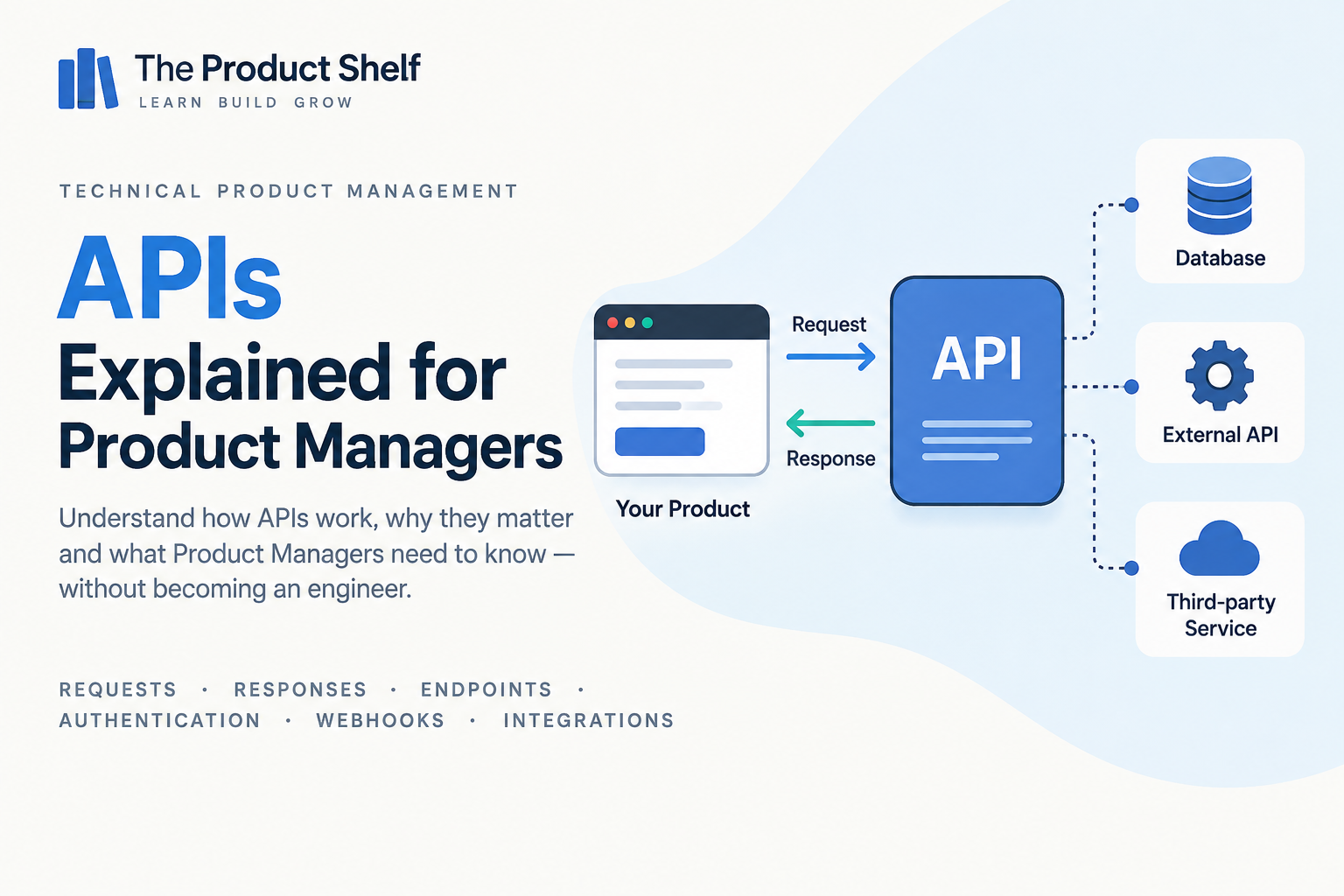
APIs are everywhere in modern digital products. They connect mobile apps with backends, allow different services inside a platform to communicate and make it possible to integrate with external providers for things like payments, authentication, messaging or analytics.
As a Product Manager, you don’t need to know how to build an API or write the code that consumes one. But if your product depends on APIs — and most digital products do — understanding how they work will make many conversations with Engineering much easier.
You should be able to understand what happens when one system asks another for information, what can go wrong, why some integrations are more complex than they initially appear and which questions to ask before committing to a feature that depends on another system.
What is an API?
An API — Application Programming Interface — is a way for two software systems to communicate with each other according to a defined set of rules.
Imagine a mobile application that needs to display a customer’s orders. The app itself may not store that information. Instead, it sends a request to another system that has access to the order data.
Conceptually:
Mobile App → API → Backend → Database
The backend receives the request, retrieves the relevant information and sends a response back to the application:
Mobile App ← API ← Backend ← Database
From the user’s perspective, they simply opened the “My Orders” screen and saw their purchases. Behind that apparently simple action, however, several systems may have communicated with each other.
An API defines how that communication happens: what can be requested, what information needs to be provided and what kind of response the requesting system can expect.
Why should Product Managers understand APIs?
Because many features that look simple in the interface depend on communication between multiple systems.
Imagine a requirement such as:
“Show the customer’s latest orders on the home screen.”
From a product perspective, it sounds straightforward. But before Engineering can build it, several questions may need to be answered. Where does the order information live? Is there already an API that provides it? Does that API return all the data the new screen needs? Who is allowed to request it? How quickly does it respond? What happens if the service is unavailable?
The UI might only contain a small card showing three orders, but implementing that card could involve a mobile or web client, a backend, one or more APIs, authentication, permissions and a database.
Understanding APIs helps Product Managers see those dependencies earlier and have much more useful conversations about scope, feasibility and risk.
Requests and responses
Most API interactions can be understood as a simple exchange: one system sends a request, and another system returns a response.
For example:
Client → Request → API
Client ← Response ← API
Imagine an ecommerce application requesting information about a particular product. Conceptually, the request could mean:
“Give me the information for product 8421.”
The API might respond with the product’s name, price, availability and other information the application needs to display.
This request-response model is one of the most useful API concepts for Product Managers because it allows you to follow technical conversations without needing to understand the underlying code. When someone says that “the API isn’t returning the field we need”, they’re talking about the information contained in that response.
What is an endpoint?
An endpoint represents a specific place where an API exposes a particular capability or resource.
For example, an ecommerce API might provide different endpoints for products, customers and orders:
/products
/customers
/orders
There might also be an endpoint for a specific order:
/orders/8421
You can think of an API as offering a collection of capabilities, with endpoints providing access to different parts of them.
This becomes relevant when discussing a new feature because an API existing doesn’t automatically mean it supports everything the product needs. The useful question is often not simply “Do we have an API?”, but “Does the API expose the capability and data required for this use case?”
HTTP methods: GET, POST, PUT, PATCH and DELETE
APIs often use HTTP methods to describe the type of action being requested. You don’t need to memorise technical definitions, but recognising the most common ones makes API documentation and Engineering conversations much easier to follow.
GET is generally used to retrieve information. For example:
GET /products/8421
Conceptually, this means: give me product 8421.
POST is commonly used to create something or trigger an action. For example:
POST /cart/items
This might mean: add an item to the cart.
PUT and PATCH are used to update information, while DELETE is used to remove something.
The important thing for Product Managers isn’t the syntax. It’s understanding that an API can expose different actions: retrieving data, creating something, changing it or deleting it. When you’re discussing what an integration supports, those capabilities matter much more than the technical notation used to represent them.
Status codes
When an API receives a request, the response usually includes a status code that indicates what happened.
Some of the most common ones you’ll encounter are:
- 200 — OK: the request succeeded.
- 201 — Created: something was created successfully.
- 400 — Bad Request: there was a problem with the request.
- 401 — Unauthorized: authentication is required or has failed.
- 403 — Forbidden: the user or system is authenticated but doesn’t have permission to perform the action.
- 404 — Not Found: the requested resource couldn’t be found.
- 429 — Too Many Requests: the caller has exceeded an allowed request rate.
- 500 — Internal Server Error: something went wrong on the server.
You don’t need to memorise every HTTP status code. What is useful is recognising that “the API failed” isn’t a very precise description. A request rejected because the user doesn’t have permission is a different problem from a server crashing, a resource not existing or an external service limiting the number of requests you can make.
That distinction can be extremely useful when investigating incidents or discussing how the product should behave when something goes wrong.
What is JSON?
APIs need a structured way to exchange information, and one of the most common formats you’ll encounter is JSON.
A product response might look something like this:
{
  "id": 8421,
  "name": "Wireless Headphones",
  "price": 89.99,
  "available": true
}
You don’t need to write JSON to work effectively as a Product Manager. What matters is being able to look at something like this and understand that the API is returning a set of fields and values: a product ID, a name, a price and an availability status.
This becomes particularly useful when a feature depends on data that isn’t currently available. If the design requires a delivery date but the API response doesn’t contain one, someone will need to determine where that information comes from and whether the API needs to change.
Understanding the shape of the data helps turn vague discussions about “the backend” into much more concrete product questions.
Authentication vs authorization
Authentication and authorization are closely related, but they answer two different questions.
Authentication asks:
Who are you?
Authorization asks:
What are you allowed to do?
A user might successfully log into an application, which means their identity has been authenticated, but that doesn’t automatically mean they can access every resource or perform every action.
For example, both a customer and an administrator may be authenticated users. The administrator might be allowed to refund an order, while the customer isn’t.
This distinction matters whenever a feature involves accounts, roles, permissions or sensitive information. If you’re defining who should be able to see or modify something, you’re already dealing with authorization even if you never touch the technical implementation.
How APIs authenticate requests
When one system calls an API, the receiving system often needs a way to verify who is making the request. Depending on the API, this might involve API keys, access tokens or other authentication mechanisms.
For a Product Manager, the implementation details are usually less important than the implications. Does the integration require users to connect their own account? Does access expire? Can permissions be revoked? Does the external provider require a particular authentication flow? What happens when credentials are no longer valid?
These questions can directly affect the user experience. An authentication mechanism isn’t just something Engineering deals with in the background; it can determine whether users need to log in again, approve permissions or reconnect an integration.
What are webhooks?
Not every integration works by repeatedly asking an API whether something has changed.
Imagine your product needs to know when a payment succeeds. One option would be to ask the payment provider every few seconds:
“Has the payment succeeded yet?”
Then ask again:
“What about now?”
And again.
That would be inefficient. Instead, many systems use webhooks, which allow one system to notify another when a particular event happens.
Conceptually:
Payment succeeds → Provider sends webhook → Your system receives event
Instead of your product constantly checking for a change, the external system tells you when the change occurs.
Webhooks are commonly used for events such as successful payments, subscription changes, deliveries, account updates or other asynchronous processes. For Product Managers, the useful distinction is understanding the difference between asking for information and being notified when something happens.
APIs can fail
When a product depends on another system, you also need to think about what happens when that system doesn’t behave as expected.
An API might be unavailable, respond too slowly, return incomplete data, reject a request, impose usage limits or change its behaviour. A third-party provider could also experience an outage completely outside your team’s control.
Suppose checkout depends on an external payment provider:
User → Checkout → Your Backend → Payment API
If the Payment API doesn’t respond, the problem may not originate in your own application, but your customer still experiences it as your checkout failing.
That makes failure behaviour a Product Management concern. What does the user see? Can they retry? Could retrying accidentally create a duplicate payment? Do we save their progress? How quickly can we detect the problem? Is there an alternative flow?
Thinking about the unhappy path is particularly important when APIs support critical journeys.
Third-party integrations
External APIs make it possible to add capabilities without building every system yourself. A product might integrate with providers for payments, maps, identity verification, email, analytics, shipping, CRM or many other services.
That can dramatically accelerate development, but it also introduces dependencies.
If your product relies on an external provider, your team doesn’t control its availability, performance, pricing, rate limits or future API changes. The provider may deprecate an endpoint, introduce a new version or change the conditions under which a particular capability is available.
So when evaluating a third-party integration, the question isn’t only “Can we connect to this API?”. It’s also worth understanding how important that dependency will become to the product and what happens if it changes or fails.
Rate limits
Many APIs limit how many requests a system can make within a particular period. These restrictions are commonly known as rate limits.
Imagine an API allows:
1,000 requests per minute
If your product suddenly tries to send 5,000, some requests may be rejected or delayed.
This may sound like a purely technical constraint, but it can have direct product consequences. A feature that works perfectly for a small beta group may behave very differently when rolled out to millions of users. An integration that looks viable during development may also require a different architecture, additional caching or a more expensive provider plan once usage increases.
For Product Managers, rate limits are another reminder that technical constraints can become product constraints at scale.
API versions and change
APIs evolve. New capabilities are added, existing behaviour changes and older versions may eventually be retired.
A provider might move from:
API v1 → API v2
If your product still depends on v1 when the provider decides to stop supporting it, your team may need to update the integration even though customers haven’t requested a new feature.
This is one reason Engineering work sometimes appears on a roadmap without producing an obvious visible change for users. Maintaining integrations, upgrading dependencies and migrating between API versions can be necessary simply to keep existing functionality working.
Understanding this makes it easier to distinguish between work that creates a new capability and work that protects a capability the product already depends on.
Questions Product Managers should ask about APIs
You don’t need to design the API yourself, but when a feature depends on one, there are several useful areas to explore with Engineering.
Start with capability and data. Does the API actually support the use case? Does it return all the information the feature needs, and can it perform the actions required?
Then consider authentication and permissions. Who can access the API, how is access granted and are there restrictions on what different users or systems can do?
Reliability and performance also matter. How quickly does the API normally respond? What happens if it’s unavailable? Are there rate limits or other constraints that could become important as usage grows?
It’s also worth discussing errors and failure behaviour. What could go wrong, how will we detect it and what should the user experience be when it happens?
Finally, understand ownership and evolution. Is this an internal API controlled by your organisation or an external dependency? Who owns it? Could it change? Is there a versioning or deprecation strategy?
You don’t need to arrive with all the answers. The value of understanding APIs is that you know which questions are worth asking before a dependency turns into an unexpected product problem.
Do Product Managers need to build APIs?
No. Understanding APIs doesn’t mean learning to implement them.
A Product Manager should be able to follow a conversation about requests and responses, recognise what an endpoint represents, understand the difference between retrieving and changing data, interpret common errors and reason about authentication, permissions, integrations and failure scenarios.
You should also be able to look at simple API documentation or a JSON response without treating it as something completely inaccessible. That doesn’t mean you need to become the person who designs the technical solution.
The goal is to have enough technical context to understand what the system can do, what it depends on and where the important product trade-offs are.
How much API knowledge does a Product Manager need?
The right level depends on the product. A Product Manager working on an API platform, developer tool or integration-heavy B2B product will naturally need much deeper knowledge than someone managing a relatively self-contained consumer feature.
For most Product Managers, however, a useful foundation includes understanding requests and responses, endpoints, HTTP methods, status codes, JSON, authentication and authorization, webhooks, rate limits, failures and third-party dependencies.
With that foundation, technical conversations become much easier to follow. Instead of hearing that “the backend needs some changes”, you can start asking whether the issue is missing data, a new endpoint, permissions, performance, an external dependency or something else entirely.
You still don’t need to write the code. You simply have a much better mental model of what is happening behind the interface.
Go deeper: APIs for Product Managers
This guide gives you the foundations for understanding how APIs connect systems and why they matter when you’re managing digital products.
If you want to explore the subject in more depth, APIs for Product Managers covers APIs specifically from a Product Manager’s perspective, helping you understand requests, responses, endpoints, authentication, integrations, webhooks and the technical conversations that appear around them — without requiring you to become a developer.
Continue learning Technical Product Management
APIs are only one part of the technical landscape Product Managers work with. Once you understand how systems communicate, the next step is seeing how those systems are structured, where their data lives, how their behaviour is measured and how changes eventually reach production.
Continue with the Technical Product Management learning path to explore software architecture, SQL and data, product metrics, observability, security and CI/CD.
Explore the book → APIs for Product Managers



APIs for Product Managers
APIs for Product Managers
Understand APIs in a simple way and make better product decisions. APIs shape far more product decisions than most Product Managers realize.
A calendar integration, a payment provider, a CRM connection, a failed synchronization, a webhook from another platform—behind all of these situations, there is a conversation happening between systems. Understanding that conversation can make a significant difference when working with Engineering.
Leave a Reply