
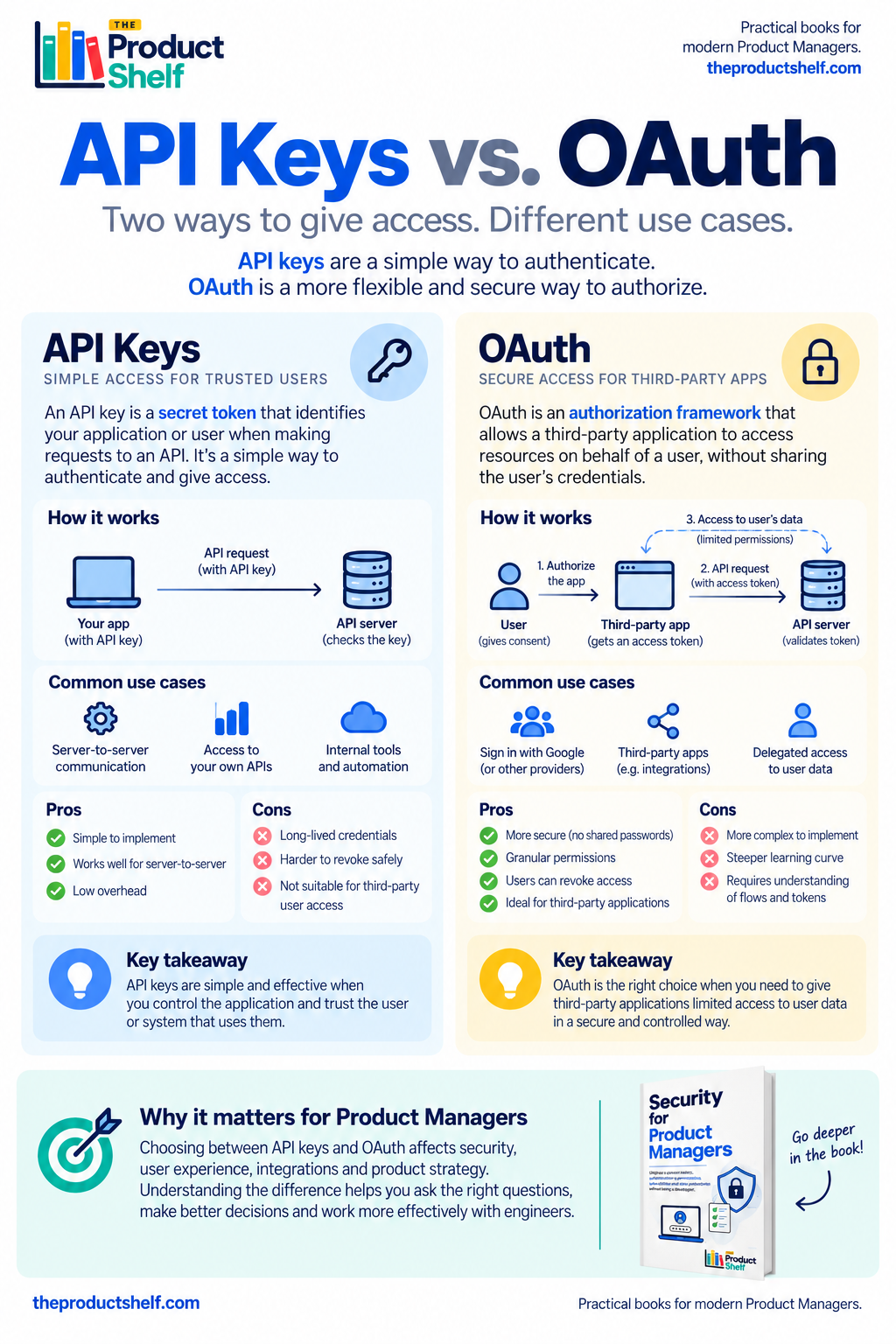
When you work on integrations, sooner or later someone from Engineering will ask a question like:
“Are we going to use an API key or OAuth?”
For a Product Manager, both can sound like different technical ways of doing the same thing: allowing one system to access another.
There is some truth to that, but the difference matters because the choice affects much more than the technical implementation. It can change the user experience, the permissions we can offer, how access is revoked and what happens if a credential is compromised.
The good news is that you don’t need to understand how to implement either of them. You just need a clear mental model of the problem each one solves.
Start with the simpler one: API keys
Imagine your company has built an internal reporting tool that needs to retrieve data from your product’s API every morning.
The reporting tool needs some way of saying:
“It’s me. I’m allowed to use this API.”
One simple solution is to give it an API key. When the tool sends a request, it includes that key and the API checks whether it recognizes it.
Conceptually, the conversation looks something like this:
Application → “Here is my API key” → API → “Key accepted”
The key is a secret, so it needs to be protected. If someone else obtains it, they may be able to make requests pretending to be the legitimate application.
This simplicity is also what makes API keys useful. They can work very well when we control the systems involved, for internal tools, automations or certain server-to-server integrations.
Things become more complicated when we introduce users and third-party applications.
Now imagine a different product problem
Suppose you are building a project management product and want users to connect their Google account.
Your application needs permission to access something belonging to the user.
One possible approach would be to ask:
“Give us your Google email and password and we’ll log in for you.”
Clearly, that would be a terrible product and security decision. Your application would now have to handle the user’s Google credentials, and the user would be giving you far more trust than necessary.
What we really want is something more like:
“I give this application permission to access these specific things in my Google account.”
That’s the type of problem OAuth is designed to solve.
Instead of giving the third-party application their password, the user authorizes access. The application receives a token that represents that authorization and can use it to access the permitted resources.
The user keeps control of their credentials, while the application gets the access it needs.
The difference is easier to understand through the user
This is where API keys and OAuth start to feel very different from a Product Manager’s perspective.
With an API key, we can think of an application presenting a secret credential when it communicates with an API.
With OAuth, we usually have another question in the middle:
What has the user authorized this application to do?
Imagine connecting a calendar application to your Google Calendar. The application might need permission to read your calendar events, but perhaps it doesn’t need permission to delete them.
That distinction matters.
OAuth allows access to be delegated without simply handing over the user’s credentials. Depending on how the integration is designed, that access can also be limited to particular permissions and revoked later.
From a product perspective, this gives us a much richer conversation than simply asking whether an application “has access”.
We can ask:
Access to what? And permission to do what?
Why not just use OAuth everywhere?
At this point, OAuth might sound like the obvious winner.
If it provides more control, why would we ever use something simpler like an API key?
Because more sophisticated doesn’t automatically mean better.
OAuth introduces additional concepts, flows and implementation complexity. If two controlled backend systems simply need to communicate with each other, introducing a user authorization flow may solve a problem that doesn’t exist.
An API key can be perfectly reasonable when the context is simple and controlled.
The mistake is not choosing API keys.
The mistake is choosing them without considering how they will be used, stored, rotated or revoked, especially when the integration involves third parties or access to user data.
This is the trade-off Product Managers need to understand. We are not choosing between a “bad” technology and a “good” technology. We are choosing mechanisms designed for different situations.
Think about the integration you’re designing
Suppose your B2B SaaS product offers an API so customers can extract their own data into an internal analytics system.
An API key might be a reasonable solution. The customer generates a credential, stores it securely in their system and uses it when calling your API.
Now imagine a different feature: you want third-party applications to appear in your marketplace, and users should be able to click “Connect” to give those applications access to specific parts of their account.
That’s a very different product experience.
Now we probably want users to understand what they are granting access to, approve it explicitly and be able to remove that access later.
This is where OAuth becomes much more relevant.
The technology follows the product problem.
The PM conversation isn’t about implementation
When Engineering starts discussing access tokens, authorization flows or API credentials, it’s easy for a Product Manager to mentally classify the entire conversation as “technical”.
But there are product questions hiding inside it.
What exactly does the integration need access to? Is the integration acting as a system or on behalf of a user? Should the user explicitly approve the connection? Can we limit what the third party can do? What happens when the user disconnects the integration? How quickly should access disappear? How will users see which applications currently have access to their account?
Those decisions affect trust and user experience as much as they affect architecture.
You don’t need to decide which OAuth flow Engineering should implement. You don’t need to know how tokens are cryptographically generated, and you certainly don’t need to build the authentication layer yourself.
But you should understand enough to ask:
“Who are we giving access to, what exactly are they allowed to access, and how can that access be removed?”
Those three questions will take you surprisingly far.
A simple way to remember the difference
If you forget everything else, keep this mental model:
API key:
“Here is my secret key. Let me access the API.”
OAuth:
“The user has authorized this application to access these specific things.”
It’s deliberately simplified, but it’s enough to recognize why the two approaches appear in different product conversations.
And that’s really the goal for a Product Manager. Not to become the person implementing OAuth, but to understand what problem Engineering is trying to solve when they suggest it.
Because when an integration touches user data, permissions and third-party access, the decision is no longer purely technical.
It’s part of the product.
Leave a Reply