
Building a feature isn’t the same as delivering it to users.
Between an engineer writing code and a customer using the new functionality, several things usually need to happen: code is combined, tested, built, deployed and eventually released.
Modern software teams automate much of this process using CI/CD pipelines.
As a Product Manager, you don’t need to configure those pipelines. But understanding how software moves from development to production can help you plan releases, evaluate risk and understand why “the feature is finished” doesn’t always mean “users can use it”.
This guide covers the CI/CD and release concepts that are most useful from a Product Manager’s perspective.
What is CI/CD?
CI/CD usually refers to Continuous Integration (CI) and Continuous Delivery or Continuous Deployment (CD). Together, these practices help teams integrate, test and deliver software changes more frequently and reliably.
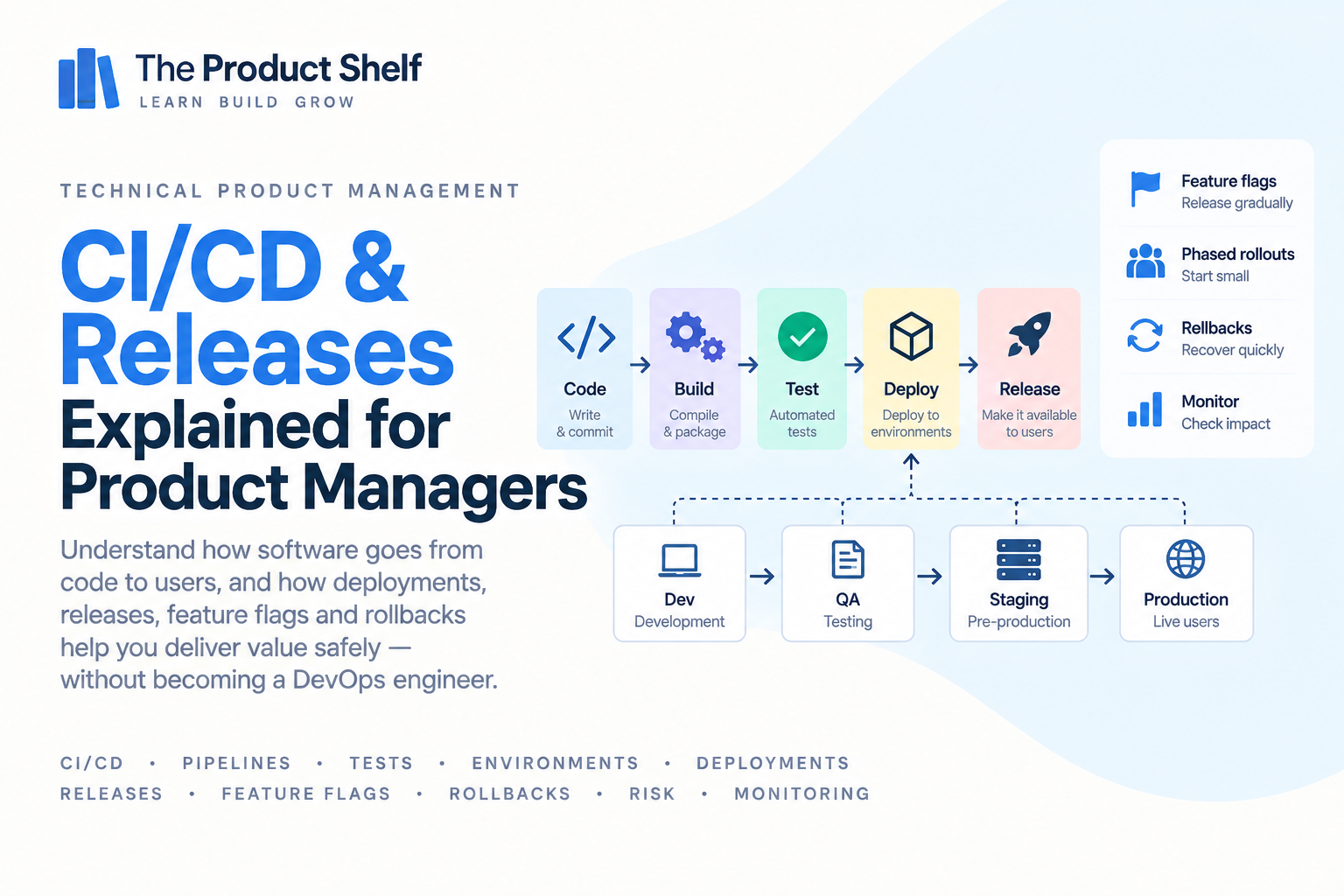
The journey from writing code to putting a feature in the hands of users involves several steps. A developer writes a change, that code is integrated with the rest of the application, automated tests check that everything still works, and a new version of the application is built. From there, the software can be deployed and, eventually, the feature can be released to users.
A simplified version of that journey looks like this:
Code → Integration → Automated tests → Build → Deployment → Release
Doing all of this manually every time a team makes a change would be slow and prone to errors. CI/CD pipelines automate many of these steps, creating a repeatable process for moving software from development towards production.
Why should Product Managers understand CI/CD?
Delivery is part of Product Management because a feature being “done” can mean very different things depending on who is speaking. When Engineering tells you that a feature is finished, the code may have been written but still be waiting for review or testing. It may have passed all its tests but only exist in a test environment, or it may already be deployed to production without being available to users yet.
These are all different stages of the delivery process, and understanding them makes release conversations much clearer. Instead of simply asking whether a feature is done, a more useful question is: Where is the change right now, and what still needs to happen before users can access it?o happen before users receive it?
What is Continuous Integration?
Software products are usually built by several engineers working on different changes at the same time. Those changes eventually need to come together, and the longer they remain separate, the greater the chance that something won’t work as expected when they’re combined.
Continuous Integration (CI) addresses this by encouraging teams to integrate code changes frequently and automatically check that they work with the rest of the application. A typical process might look like this:
Code change → Commit → Automated checks → Tests → Build succeeds or fails
Running these checks every time new code is integrated allows teams to identify problems much earlier, rather than discovering them after multiple changes have accumulated.
From a Product Manager’s perspective, you don’t need to understand how the CI process is configured. What matters is understanding its purpose: to continuously check that new changes integrate correctly and haven’t broken existing functionality.
Why do automated tests matter?
Every software change introduces some degree of risk because modifying one part of a product can have unexpected effects somewhere else. Automated tests help reduce that risk by repeatedly checking that existing functionality still behaves as expected after new code is introduced.
Imagine, for example, that the team makes a change to the checkout. Automated tests could verify that users can still complete the main journey:
Add an item → Start checkout → Submit payment → Create an order
Product Managers don’t need to know how to write these tests, but understanding their purpose helps explain why good test coverage makes it safer to modify complex systems. It also provides useful context when Engineering wants to spend time improving or expanding the test suite: that work may not produce a visible new feature, but it can reduce the risk of future changes and make the product easier to evolve safely.
What is a build?
Before software can be deployed or distributed, the source code often needs to go through a build process that transforms it into a version the system can actually run. In simple terms, the journey looks like this:
Source code → Build process → Deployable application
This is why you may hear engineers talk about “the latest build” or say that “the build failed”. If the build can’t be completed successfully, the change usually can’t continue through the delivery pipeline until the problem is fixed.
For Product Managers, the useful distinction is that writing the code and having a working version of the application ready to deploy are not necessarily the same thing. A feature may be complete from a development perspective but still fail at a later step before it can move towards production.
What is a CI/CD pipeline?
A pipeline is an automated sequence of steps that software goes through as it moves from code towards production. Although the exact process varies between organisations, a simplified pipeline might look like this:
CODE → BUILD → TEST → DEPLOY → RELEASE
In practice, a pipeline can include many more steps. Teams may automatically check code quality, run different types of tests, perform security checks, build the application, deploy it to a testing environment and verify that everything is working correctly before allowing the change to reach production.
Some organisations have relatively simple pipelines, while others have much more complex ones with multiple environments, approvals and automated checks. The exact setup isn’t particularly important from a Product Management perspective. What matters is understanding that software delivery is a process rather than a single action. A developer finishing the code is only one part of the journey; several things may still need to happen before that change reaches users.
Environments: DEV, QA, staging and production
Software teams usually work with several environments, which allow changes to be built and tested without immediately affecting real customers. You may encounter slightly different names depending on the company, but a common setup includes DEV, where software is actively being developed; QA or TEST, where teams verify that it behaves as expected; STAGING or PRE-PRODUCTION, which is designed to resemble the production environment as closely as possible; and finally PRODUCTION, the environment used by real customers.
A simplified journey through these environments might therefore look like:
DEV → QA → STAGING → PRODUCTION
Not every company uses exactly this structure, and some organisations have additional environments or different names for them. For a Product Manager, remembering the terminology is less important than knowing which environment a feature is currently in. Something working perfectly in QA, for example, doesn’t mean customers can use it yet.
Deployment vs release
One of the most useful distinctions for Product Managers is the difference between a deployment and a release. They are often spoken about as if they were the same thing, but they don’t necessarily happen at the same time.
A deployment means putting a version of the software into an environment. A release, on the other hand, means making functionality available to users. This means a team can deploy new code to production while keeping the corresponding feature hidden.
For example:
Version B deployed to production → Feature remains OFF → Testing and verification → Feature switched ON
In this scenario, the software was already running in production before users could access the new functionality. Separating deployment from release gives teams much more control over when and how a feature reaches customers, and one of the mechanisms that makes this possible is the feature flag.
What are feature flags?
A feature flag allows functionality to be turned on or off without necessarily deploying another version of the software. Imagine that the team has developed a new checkout and the code is already running in production, but the feature is configured as:
New Checkout: OFF
When the team is ready to make it available, the configuration can change to:
New Checkout: ON
The important point is that the code didn’t suddenly arrive in production when the flag was switched on; it was already there. The flag simply controlled whether users could access it.
Feature flags can also provide much more granular control than a simple ON/OFF switch. A team might enable a feature for employees first, then beta users, then 10% of customers and eventually everyone. Depending on the system, access could also be controlled by market, platform, customer type or other criteria.
This makes it possible to separate two decisions that would otherwise be tightly connected: when the code is deployed and when the feature is exposed to users.
Why are feature flags useful to Product Managers?
That separation creates several useful options from a Product Management perspective. A feature can be tested internally before launch, exposed to a beta group, gradually rolled out to customers, used as part of an experiment or released only in selected markets. A team may also be able to disable problematic functionality quickly without deploying another version.
Feature flags therefore aren’t simply an engineering mechanism. They can become part of the product release strategy, giving Product and Engineering teams more flexibility over who receives a feature, when they receive it and how quickly exposure increases.
What is a rollback?
Sometimes a deployment introduces a serious problem. If the issue is significant enough, one possible response is a rollback, which means returning the software to a previous version.
Conceptually, the process might look like this:
Version A → Deploy Version B → Problems appear → Rollback → Return to Version A
Rolling back can be an effective way to recover from a problematic deployment, but it isn’t always the only option. If the issue is isolated to functionality controlled by a feature flag, the team may be able to keep the current software version and simply disable that feature.
For example:
Version B + New Checkout ON → Problem detected → Version B + New Checkout OFF
In this case, Version B remains deployed. Only the problematic functionality has been switched off.
Rollback vs feature flag
Rollback and feature flags can therefore both help teams recover from problems, but they do so in different ways. A rollback returns the software to an earlier version, while a feature flag allows the current version to remain in place while specific functionality is disabled.
The distinction becomes particularly important when a deployment contains several changes. Rolling back the entire version could remove functionality that is working correctly alongside the problematic change. If that change is independently controlled by a feature flag, disabling it may provide a much more targeted response.
There isn’t a universally correct option. The appropriate response depends on what failed, how the software is designed and what recovery mechanisms the team has available.
What is a phased rollout?
Releasing a feature doesn’t necessarily mean making it available to every user at the same time. Teams can use a phased rollout to gradually increase the percentage of users who receive a change.
For example:
1% → 5% → 20% → 50% → 100%
At each stage, the team has an opportunity to observe how the new version behaves before expanding its exposure. They might look for increases in errors, changes in performance or unexpected movements in product metrics. If something starts to go wrong, the rollout can potentially be paused before every customer is affected.
This gives teams another way of managing release risk: instead of trying to eliminate every possible problem before launch, they can also limit the impact of an unknown problem by controlling initial exposure.
What is a canary release?
A canary release follows a similar principle. Rather than sending a new version to all traffic immediately, the team exposes it to a small subset of users or traffic first and observes what happens.
If the system continues to behave normally, exposure can be increased. If problems appear, the team may stop or reverse the rollout before the issue affects a much larger population.
Product Managers don’t need to know how a canary release is technically configured. The useful concept is that release risk can sometimes be managed by controlling how many users are exposed to a change at first.
What is blue-green deployment?
Blue-green deployment is another strategy designed to make software changes safer. Instead of replacing the existing production version directly, the team maintains two production environments.
Imagine that BLUE is currently serving users with Version A, while GREEN contains the new Version B being prepared:
BLUE → Version A → currently serving users
GREEN → Version B → being prepared
Once Version B has been validated, traffic can be redirected from BLUE to GREEN. If a serious problem appears after the switch, the system may allow traffic to be redirected back to BLUE.
You don’t need to understand how the underlying infrastructure is configured to work with teams that use this approach. From a Product Management perspective, the important idea is that deployment strategy can affect both release risk and the team’s ability to recover when something goes wrong.
Releases aren’t always all-or-nothing
Product launches are often discussed as though they have only two possible states: not launched and launched. Modern software delivery allows for much more flexibility.
A feature could already be deployed but disabled, available only to employees or beta users, released in one country, exposed to 10% of customers, limited to new users or enabled everywhere except on a particular platform. There can therefore be many intermediate states between “not available” and “available to everyone”.
For Product Managers, this creates opportunities beyond technical risk management. The way a feature is released can support testing, experimentation, market sequencing and customer communication. Release strategy itself can become a Product Management tool.
Web releases vs mobile app releases
Web products and mobile applications differ in an important way when it comes to software delivery. With many web products, the company controls the software running on its own servers. A new backend or web version can therefore often be deployed centrally, and users automatically interact with the new version the next time they use the product.
Mobile applications introduce another step:
New app version → App Store / Google Play → User’s device → User updates
Once an application has been distributed through an app store, the company doesn’t fully control when every user installs the new version. Some users update immediately, others wait, and some may continue using an older version for a long time.
As a result, several versions of the same application may be active simultaneously:
4.6 ← newest version
4.5
4.4
4.3 ← some users still here
That fragmentation creates additional product and engineering complexity that doesn’t exist in quite the same way with centrally controlled web applications.
Version fragmentation
When customers are running different versions of a mobile application, backend systems may need to support several versions at the same time.
For example:
App 4.4 ─┐
App 4.5 ─┼──→ Backend
App 4.6 ─┘
A backend change that works perfectly with the newest application might still need to remain compatible with customers running an older version. Removing or changing something on the backend without considering those users could break functionality for people who haven’t updated their app yet.
This is one reason mobile releases often require careful coordination between frontend and backend teams. The team isn’t necessarily supporting one single version of the product at any given moment.
Why mobile rollbacks are different
This also changes what happens when a release goes wrong. With a server-side application, a team may be able to roll back a problematic deployment relatively quickly because it controls the software running on its servers.
With a mobile application, users may already have the problematic version installed on their devices. You can’t simply remove that version from every phone and restore the previous one.
Recovery may instead look more like this:
Bug discovered in 4.6 → Fix created → New build → Validation → Store distribution → Users update
That process can take considerably longer, and even after the corrected version becomes available, users still need to install it. Understanding this difference helps Product Managers think about release risk before a mobile version is distributed, particularly when a change affects critical functionality.
Release risk
Not every release deserves the same level of caution. Changing the colour of a secondary button doesn’t carry the same potential impact as modifying payment processing, authentication or another critical journey.
When assessing release risk, useful questions include:
- How many users could be affected?
- Which critical journeys are involved?
- Can the change be disabled independently?
- Can we roll back?
- Can we release gradually?
- How quickly would we detect a problem?
- How quickly could we recover?
- Are external systems involved?
The release strategy can then reflect the potential impact of failure. A low-risk change may not need elaborate controls, while a change affecting payments or another critical capability might justify gradual exposure, additional monitoring or a clear recovery plan.
Observability and releases
A safe release doesn’t end when the deployment pipeline reports success. Once a change reaches production, teams still need to understand how the system and the product behave afterwards.
Technical signals such as error rate, response time and crash rate can reveal whether the software itself is healthy. At the same time, product signals such as payment failures, conversion, activation or support contacts can show whether the change is affecting users in unexpected ways.
This distinction matters because a deployment can be technically successful while the product outcome gets worse. Imagine that the pipeline completes without errors and the new version reaches production successfully, but checkout conversion then drops by 12%.
Deployment succeeded ✓ → Checkout conversion ↓ 12%
Nothing necessarily went wrong with the deployment itself. The software reached production exactly as intended. The problem is that users are now behaving differently or encountering an issue that the pipeline wasn’t designed to detect.
This is where software delivery connects directly with observability and product metrics. Knowing that a version reached production is only the beginning; teams also need to know what happened once customers started using it.
What happens when a release goes wrong?
Imagine that a new version has just been deployed. Shortly afterwards, the team notices that the error rate is increasing, checkout conversion is falling and support contacts are starting to rise.
The response might involve several steps:
Detect the problem → Investigate → Stop the rollout → Disable the feature or rollback → Recover → Understand what happened
Exactly what happens will depend on the system and the problem. A gradual rollout might simply be paused. A feature flag could allow the team to disable the affected functionality, while a broader problem might require rolling back the deployment entirely.
Once the immediate issue has been resolved, the team can investigate what happened and decide whether changes are needed in the software, tests, monitoring or release process. This is one of the points where CI/CD, observability, software architecture and Product Management all come together.
Questions Product Managers should ask before a release
Product Managers don’t need to manage the deployment itself, but they should understand enough about the release to have a clear picture of what is happening and what the team will do if something goes wrong.
Before an important release, useful questions include:
- Scope: What exactly is being released?
- Users: Who will receive it?
- Timing: When will it become available?
- Dependencies: Does anything else need to be deployed first?
- Control: Can the feature be enabled or disabled independently?
- Rollout: Can we release it gradually?
- Risk: What could go wrong?
- Detection: How will we know if something goes wrong?
- Recovery: Can we roll back or disable the feature?
- Metrics: What will we monitor after release?
- Ownership: Who is responsible if intervention is needed?
These aren’t questions designed to turn a Product Manager into the person responsible for DevOps. They help turn a technical deployment into a product release plan, connecting what Engineering is doing with users, timing, risk and expected outcomes.
“Done” has several meanings
One of the reasons delivery conversations can become confusing is that the word “done” can refer to several different states.
A feature may be code complete but not yet tested. It might have passed testing but still be waiting for deployment. It could already be deployed to production but remain hidden behind a feature flag, or it might have been released only to 10% of users. Even after it becomes available to everyone, there is still another question: is it actually delivering the outcome we expected?
So rather than asking whether a feature is “done”, it is often more useful to ask:
What state is the feature currently in?
That question gives you much more information about what has already happened, what still needs to happen and whether the feature is actually in the hands of users.
Do Product Managers need to understand CI/CD?
Product Managers don’t need to configure Jenkins, GitHub Actions, GitLab pipelines or deployment infrastructure. They do, however, benefit enormously from understanding the journey software takes between an engineer writing code and a customer using the resulting product.
A useful foundation includes understanding concepts such as Continuous Integration, Continuous Delivery, builds, automated tests, pipelines, environments, deployments, releases, feature flags, rollbacks, gradual rollouts and mobile versioning. You don’t need the same depth of knowledge as the engineers designing these systems, but knowing what these concepts mean makes it much easier to understand delivery status, discuss release risk and make informed product decisions.
The purpose isn’t to become a DevOps engineer. It’s to understand how the product changes you’re managing actually reach users.
Go deeper: CI/CD and Releases for Product Managers
This guide gives you the foundations you need to follow delivery and release conversations with confidence. If you want to explore the subject in more depth, CI/CD and Releases for Product Managers follows the entire journey from code to production specifically from a Product Manager’s perspective.
It covers pipelines, environments, automated tests, deployments, feature flags, rollbacks, phased releases and mobile distribution, with a particular focus on how those concepts affect product planning, release risk and collaboration with engineering teams.
Explore the book → CI/CD and Releases for Product Managers
CI/CD and releases for Product Managers
A developer finishes a ticket. The code is ready. But the feature still isn’t available to users.
Why?
Between writing code and releasing a feature, there is an entire delivery process that Product Managers often experience as a black box: builds, automated tests, pipelines, environments, staging, deployments, feature flags, rollouts, rollbacks, hotfixes, release trains, and more.
Continue learning Technical Product Management
CI/CD and releases are one part of the technical landscape behind modern digital products.
The Technical Product Management learning hub also covers APIs, software architecture, SQL and data, product metrics, logs and observability, and security.
Explore the Technical Product Management learning hub
Leave a Reply