
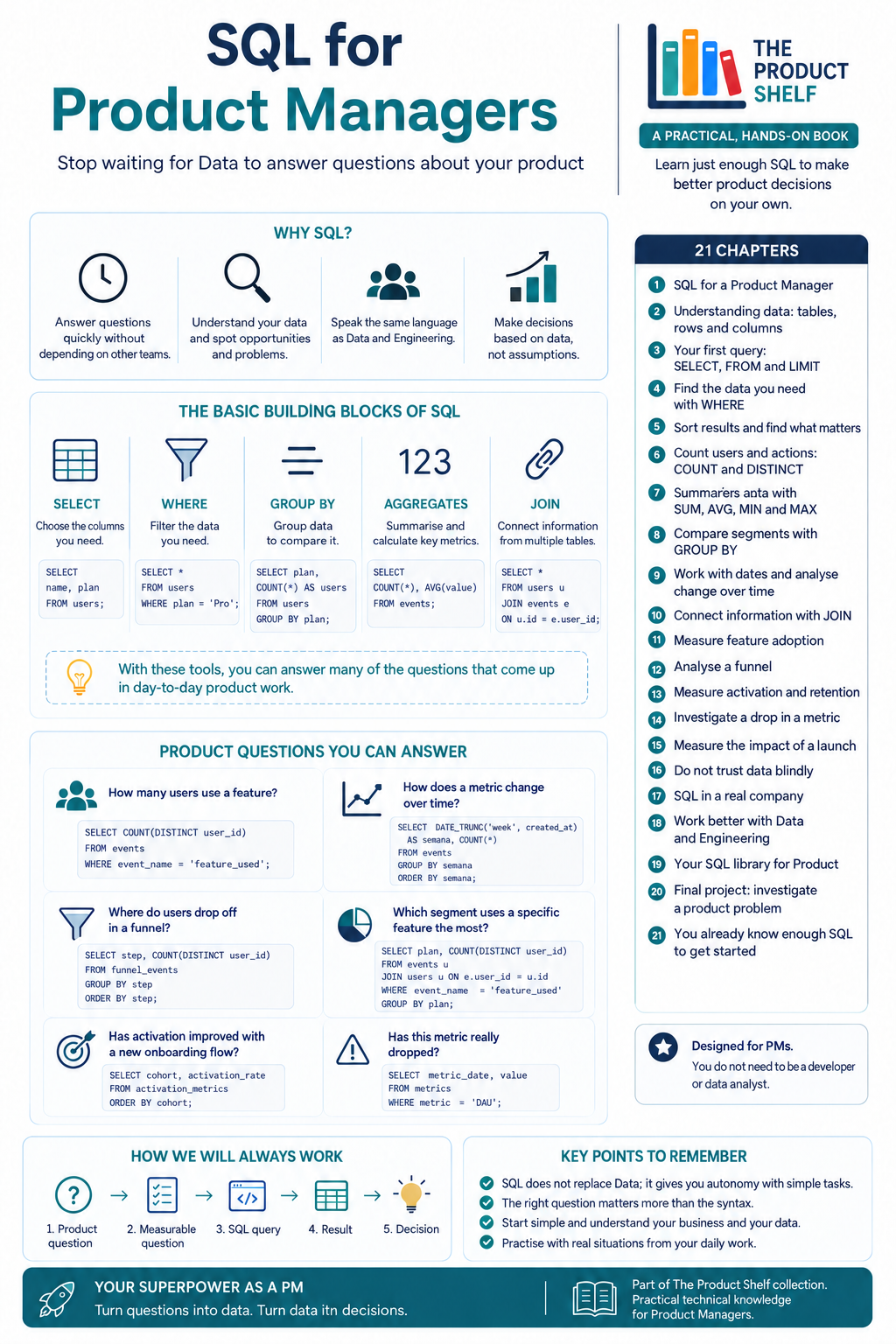
Product Managers make decisions constantly: which feature to prioritise, where users abandon a journey, whether a release has improved activation or which customer segment uses a particular feature the most.
Many of those answers are hidden in the data. The problem is that they are not always available in a dashboard. When you depend on someone else to retrieve them, even a relatively simple question can take days to answer.
SQL for Product Managers
Learning SQL allows Product Managers to query information stored in a database, validate hypotheses and answer basic questions about their products without always having to wait for the Data team.
The goal is not to become a data analyst or developer. It is to gain enough autonomy to investigate questions and make better-informed decisions.
What is SQL?
SQL stands for Structured Query Language. It is a language used to query and work with information stored in relational databases.
These databases organise information into tables made up of rows and columns. A user table, for example, might contain one row for each registered person and columns such as:
- User ID.
- Registration date.
- Country.
- Subscription plan.
- Account status.
Another table might contain events generated inside the product, such as logins, page views, feature activations or purchases.
SQL allows us to select, filter, sort, group and connect this information to answer specific questions.
Why should a Product Manager learn SQL?
SQL can shorten the distance between a product question and its answer.
Imagine that you need to know how many users interacted with a new feature during the last seven days. That information may not be available in an existing dashboard. Without SQL knowledge, you would have to ask the Data team, explain the context and wait for someone to prioritise the request.
With a relatively simple query, you could perform an initial investigation yourself.
This autonomy does not replace the work of Data teams. Complex analyses, statistical models and rigorous metric definitions still require specialised knowledge. However, SQL enables Product Managers to answer exploratory questions and participate in conversations about data with much more context.
It can also help you identify problems, validate results and understand how product activity is recorded.
The basic building blocks of SQL
A query may look complicated at first, but much of the SQL a Product Manager needs can be built by combining a few fundamental elements.
SELECT: choose the information
SELECT specifies which columns you want to retrieve.
If a table contains dozens of fields, for example, you can select only the user’s name and subscription plan. This prevents the query from returning unnecessary information and makes the results easier to interpret.
FROM: identify the source
FROM specifies the table you want to query.
A database may contain separate tables for users, subscriptions, payments, orders, sessions and events. Before writing a query, you need to understand where the relevant information is stored.
WHERE: filter the results
WHERE allows you to define conditions.
You can use it to retrieve only users from a particular country, accounts with a specific plan or events generated within a particular period.
This filter is essential because most product questions refer to a specific group, behaviour or timeframe.
GROUP BY: compare groups
GROUP BY organises data according to one or more characteristics.
For example, you could group users by country, subscription plan, acquisition channel or application version. You can then calculate a metric for each group and compare the results.
This might reveal whether a feature has higher adoption among paying customers or whether activation differs between markets.
Aggregate functions: summarise information
Aggregate functions perform calculations across a set of records.
Some of the most commonly used are:
COUNTto count records.SUMto add values.AVGto calculate an average.MINto find the lowest value.MAXto find the highest value.
These functions turn thousands of individual rows into metrics that can be interpreted and used in decision-making.
JOIN: connect different tables
The information required to answer a question is not always contained in a single table.
Basic user information might be stored in one table, while their activity inside the product is stored in another. JOIN connects both tables using a shared field, such as the user ID.
This makes it possible to analyse not only what happened, but also who performed the action and which customer segment they belong to.
Product questions you can answer with SQL
These basic concepts are enough to investigate many common product questions:
- How many users interact with a particular feature?
- What percentage of users complete the onboarding process?
- At which stage of a funnel do most users abandon?
- How has a metric changed over the last few weeks?
- Which customer segment has the highest adoption?
- Did activation improve after a product change?
- How many users return after one week?
- Does a drop in a metric affect the entire product or only one market?
The challenge is not simply writing the query. Before opening a data tool, you need to turn a general concern into a measurable question.
“Is the new feature performing well?” is too ambiguous.
“What percentage of active users interacted with the feature at least once during the last seven days?” defines a population, an action and a period. That question can be translated into a SQL query.
From a product question to a decision
The process should always begin with a product question, not with the data that happens to be available.
First, define what you want to understand. Then turn that concern into a measurable question, write the SQL query, review the result and decide what it means for the product.
A simple workflow looks like this:
- Start with a product question.
- Turn it into a measurable question.
- Write the SQL query.
- interpret and validate the result.
- Use the information to make a decision.
SQL provides data, but it does not automatically explain why something happened. If feature adoption decreases, you will still need to investigate possible causes, review recent changes and perhaps combine quantitative analysis with qualitative research.
Do not trust the results blindly
A query can run successfully and still provide the wrong answer.
You might be counting duplicate events, including internal users or interpreting a date incorrectly. The same business concept may also have different definitions across the organisation.
For example, an “active user” could mean someone who logged in, someone who completed a specific action or someone who used the product at any point during the last 30 days.
Before using a result to make a decision, check:
- What each table and column represents.
- How events are recorded.
- Whether the data contains null values or duplicates.
- Which period is being analysed.
- Which users should be included or excluded.
- Whether the metric matches the definition used by the business.
Understanding the context remains more important than writing a technically perfect query.
SQL as a Product Manager superpower
Learning SQL does not mean replacing Data or Engineering teams. It means collaborating with them more effectively, asking more precise questions and independently handling some of the everyday data needs that arise when managing a product.
Start with the tables related to your own product, understand how the data is organised and practise using real questions from your day-to-day work. You do not need to master the entire language before SQL becomes useful.
With SELECT, WHERE, GROUP BY, a few aggregate functions and a basic understanding of JOIN, you can answer a significant number of the questions that appear during product development.
The real superpower is not writing SQL. It is turning questions into data and data into better product decisions.



SQL for Product Managers
Product Managers work with data every day, but getting answers shouldn’t always mean waiting for an analyst or asking someone else to write a query.
SQL for Product Managers gives you the practical SQL knowledge you need to explore product data independently and answer many of the questions that appear in your day-to-day work.
Leave a Reply