
What Product Managers Need to Know About Software Architecture
Software architecture can sound like something that belongs entirely to Engineering, but many product decisions are influenced by how the software behind the product is structured.
A feature that looks simple in a design may require changes across several systems. Two apparently similar ideas can have very different implementation costs, and decisions made years ago can affect what a team can build quickly today. Understanding the basics of software architecture helps Product Managers make sense of those situations without needing to become software architects themselves.
The goal isn’t to design systems or decide which technical patterns Engineering should use. It’s to understand enough about how the different parts of a product fit together, depend on each other and behave under different conditions to have better conversations about scope, complexity, risk and trade-offs.
What is software architecture?
Software architecture describes how the main parts of a software system are organised and how they interact with each other.
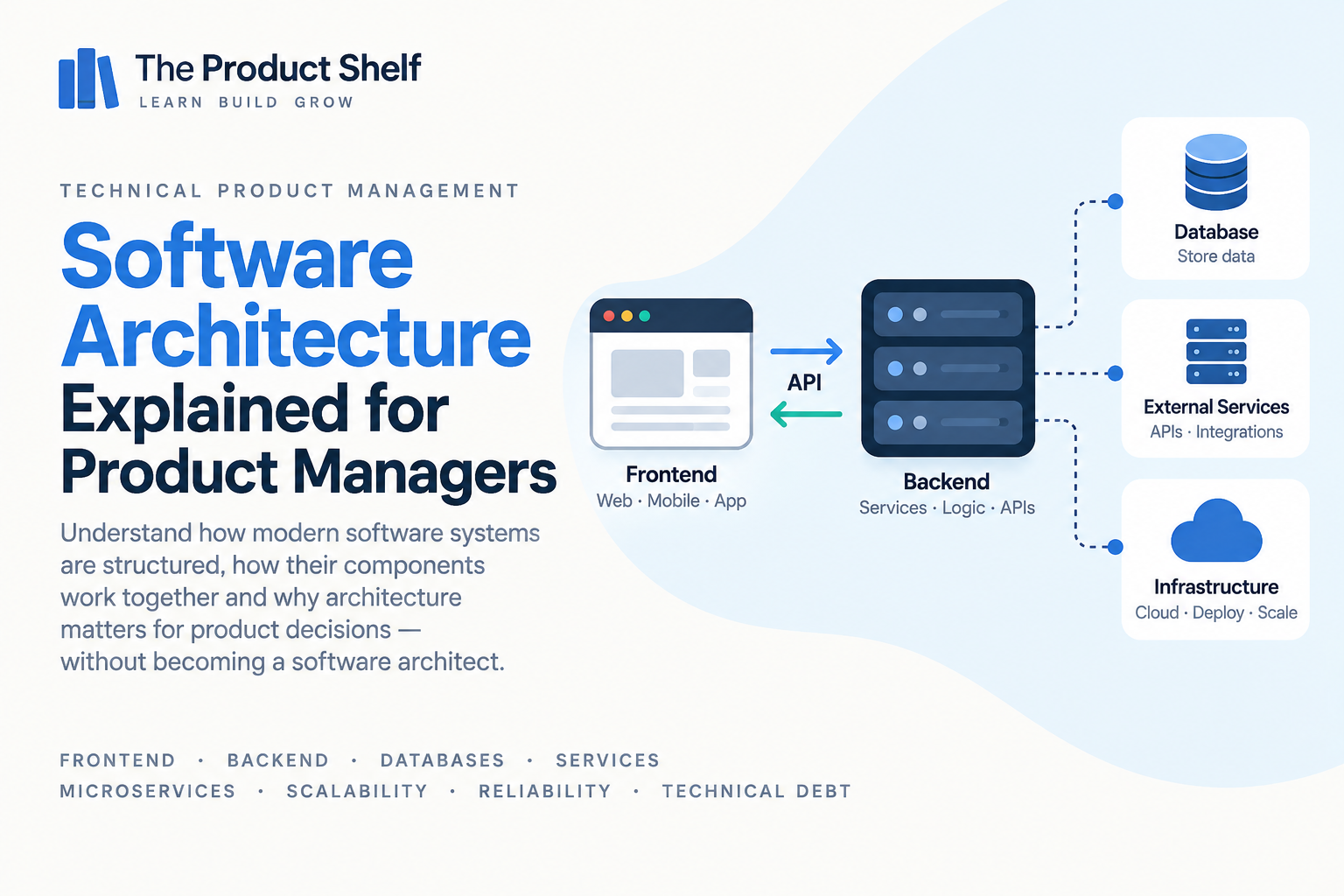
A digital product that looks like a single application to the user may actually consist of many different components behind the scenes. A simplified architecture could look something like:
User → Frontend → Backend → Database
The frontend presents the interface, the backend handles much of the application logic and the database stores information. In a real product, the picture can be considerably more complex. The backend may consist of several services, the product may communicate with external providers, data may be stored in different systems and infrastructure components may sit between them.
Architecture is essentially the structure that allows all of those pieces to work together.
For Product Managers, the important thing isn’t being able to design that structure. It’s recognising that the interface users see is only one part of the product and that changes to it may require work in several other parts of the system.
Why should Product Managers understand software architecture?
Because architecture affects what can be built, how difficult it is to change and what kinds of risks or dependencies a feature introduces.
Imagine two features that look equally simple in a design. The first uses information that already exists in the same system and is readily available. The second needs data owned by another service, requires changes to an API and depends on an external provider.
From the user’s perspective, both features might amount to adding one small element to a screen. From an Engineering perspective, however, they can be completely different pieces of work.
A basic understanding of architecture helps explain why estimates aren’t determined by how large something looks in the interface. It also allows Product Managers to ask better questions when Engineering says that a seemingly small change is technically complex.
Frontend and backend
One of the most common distinctions you’ll hear is between the frontend and the backend.
The frontend is the part of the product users interact with directly: screens, buttons, forms, navigation and other visible elements. The backend runs behind the interface and handles things such as business logic, data processing, permissions and communication with other systems.
A simplified interaction might look like:
User → Frontend → Backend → Database
and the result then travels back:
User ← Frontend ← Backend ← Database
Imagine a user opening their order history. The frontend displays the screen, but it may need to ask the backend for the relevant orders. The backend retrieves that information from a database or another service and returns it to the frontend, which presents it to the user.
This is why a feature that appears to be “just a new screen” can require both frontend and backend work.
Clients and servers
You’ll also hear engineers talk about clients and servers. A client is generally the software requesting something, while a server receives that request and provides a response or performs some work.
A web browser can be a client. A mobile application can also be a client. They may both communicate with the same backend server:
Web App ─┐
** ├──→ Backend**
Mobile App ─┘
This becomes relevant when a product exists across several platforms. A backend change may support all of them, while a change to the iOS interface affects only the iOS application.
Understanding where a change needs to happen makes discussions about scope and dependencies much clearer.
Databases
Most software products need somewhere to store information. That might include users, subscriptions, orders, messages, transactions, preferences or almost anything else the product needs to remember.
A database provides structured storage for that information. In a simplified architecture:
Frontend → Backend → Database
The frontend usually doesn’t access the database directly. Instead, it asks the backend for information, and the backend determines what data should be retrieved or changed.
For Product Managers, databases become relevant whenever a feature requires information that doesn’t currently exist, is stored somewhere else or is represented differently from what the new use case requires. A design might ask to display a new customer attribute, for example, but before that field can appear in the interface the team needs to know whether the information is actually being stored and where it comes from.
This is also where understanding some basic SQL and data concepts becomes useful, because the way information is stored affects how easily it can later be queried, analysed and used by the product.
Services
As software grows, different responsibilities may be separated into different services.
An ecommerce platform, for example, might contain separate areas responsible for:
Users → Orders → Payments → Notifications → Shipping
These don’t necessarily correspond to five completely independent applications, but they illustrate how responsibilities can be divided inside a larger system.
When a feature touches several of these areas, multiple services — and sometimes multiple Engineering teams — may need to coordinate. A change to the checkout could involve the order system, payment processing, inventory and notifications even though the user experiences it as one continuous journey.
Understanding services helps Product Managers identify those dependencies earlier instead of discovering them halfway through delivery.
Monoliths and microservices
Two terms that often appear in architecture conversations are monolith and microservices.
In a monolithic architecture, many capabilities are contained within one larger application. Conceptually:
Users + Orders + Payments + Notifications → One application
With microservices, those responsibilities may instead be separated into smaller independently operated services:
User Service
Order Service
Payment Service
Notification Service
Microservices can allow teams to develop, deploy and scale parts of a system more independently, but that independence also introduces additional communication, operational and coordination complexity.
A monolith isn’t automatically bad, and microservices aren’t automatically better. The appropriate architecture depends on the product, organisation, scale and problems the team is trying to solve.
Product Managers don’t need to decide which architecture should be used. The useful part is understanding that architectural choices create trade-offs, and that those trade-offs can influence delivery speed, ownership, reliability and the cost of future changes.
Synchronous and asynchronous communication
Systems don’t always communicate in the same way.
With synchronous communication, one component asks another component for something and waits for the response before it can continue.
Conceptually:
Service A → Request → Service B → Response → Service A continues
Imagine checkout calling a payment service and waiting to know whether the payment succeeded. The next step may depend directly on that response.
With asynchronous communication, a system can initiate or publish something without waiting for all subsequent work to finish.
For example, once an order has been created, the customer may not need to wait while the system also sends an email, updates analytics and triggers other background processes.
This distinction matters because it affects both the user experience and how failures propagate through a system. If every action waits for several other systems to respond, one slow dependency can make the entire experience slow.
Queues and events
Asynchronous systems often use concepts such as queues and events to coordinate work.
Imagine that an order has just been created. Instead of the order service directly performing every related action, it could publish an event:
Order Created
Other parts of the system can then react to it:
Order Created → Send confirmation email
** → Update analytics**
** → Start fulfilment**
The service creating the order doesn’t necessarily need to know everything that will happen afterwards. Its main responsibility may already be complete.
For Product Managers, the useful concept is that not everything a product does needs to happen immediately or as part of the same request. This can help explain why some actions appear instantly while others happen moments later, and why different parts of a journey may fail independently.
Caching
Sometimes retrieving or calculating the same information repeatedly is expensive or slow. A cache stores information temporarily so it can be accessed more quickly.
Imagine that thousands of users request the same product information. Instead of retrieving the full data from the original source every time, the system may temporarily store a copy that can be served much faster.
Conceptually:
User → Cache → Data
rather than repeatedly:
User → Backend → Database → Data
Caching can improve performance and reduce load, but it introduces another consideration: cached information may temporarily be older than the source data.
That’s why users can sometimes change something and not see the update reflected immediately. The underlying information may already have changed while another part of the system is still showing a cached version.
You don’t need to understand how the cache is implemented. What matters is recognising the trade-off between speed, efficiency and freshness of data.
Scalability
A system that works perfectly for 1,000 users may behave very differently with one million.
Scalability is the ability of a system to handle increasing demand without its performance or reliability degrading beyond acceptable levels.
Growth can put pressure on many parts of an architecture: databases may receive more queries, APIs may handle more requests, background jobs may accumulate and third-party services may hit usage limits.
This means product growth can eventually create technical work even when no new user-facing feature is being added. Engineering may need to improve infrastructure, optimise queries or redesign part of a system simply to support the product’s existing functionality at a larger scale.
For Product Managers, scalability is therefore not an abstract Engineering concern. It becomes a product concern whenever expected usage changes significantly.
Reliability and availability
Users expect products to work when they need them. Reliability broadly concerns whether a system behaves correctly and consistently, while availability relates to whether the system is accessible and able to serve users.
Increasing reliability usually requires investment. Teams may add redundancy, monitoring, automated recovery mechanisms or other safeguards, but each of those comes with a cost in time, infrastructure and complexity.
This creates a product trade-off. Not every capability necessarily needs the same level of reliability. A temporary failure in an optional recommendation widget doesn’t have the same impact as a failure in payment processing or emergency functionality.
Product Managers don’t need to define the technical solution, but they should understand which capabilities are critical, what happens when they fail and how much reliability the product actually requires.
Dependencies
Software rarely exists in isolation. A feature may depend on another internal service, an API, a database, a third-party provider or infrastructure owned by another team.
For example:
Checkout → Order Service → Payment Provider
If the payment provider is unavailable, checkout may fail even though your own systems are operating correctly.
Dependencies matter because they affect reliability, ownership and delivery planning. A feature that requires another team to change its service may have a different timeline from one your team controls entirely. An external dependency can also introduce risks that your organisation can’t directly fix.
When Engineering mentions a dependency, a useful Product Management question is therefore not just “How long will it take?”, but also “Who controls this dependency, and what happens if it isn’t available when we need it?”
Technical debt
As products evolve, teams sometimes make decisions that optimise for the immediate need rather than the ideal long-term solution. Over time, those decisions can accumulate into what is commonly called technical debt.
Technical debt doesn’t necessarily mean the original decision was bad. A team may deliberately choose a faster or simpler solution because getting something to market quickly is more valuable at that moment. The trade-off is that future changes may become more difficult or expensive.
Imagine a system built quickly to support one market. Years later, the company wants to support ten markets, multiple currencies and several pricing models. The original architecture may still work, but extending it could now require considerably more effort.
From a Product Management perspective, the important thing is to understand the consequences. Technical debt can affect delivery speed, reliability, Engineering effort and the cost of future product decisions.
Refactoring
Refactoring means improving the internal structure of software without necessarily changing what users can do.
This can make the work difficult to prioritise from a Product perspective because the result may not be visible to customers. The interface looks the same before and after, yet Engineering may spend significant time on it.
The value is often in what becomes easier afterwards. A refactor might reduce complexity, make the system safer to modify, improve maintainability or remove constraints that are slowing down future development.
When Engineering proposes a refactor, you don’t need to discuss classes, modules or design patterns. The useful conversation is about the relationship between the investment now and the product or Engineering constraint it addresses. What is difficult today? What risk are we carrying? What future work becomes easier or safer if we make this change?
Legacy systems
The word legacy is often used to describe older systems, but age alone doesn’t tell you whether software is a problem.
A system built ten years ago can be stable, easy to maintain and perfectly suited to its purpose. A system built six months ago can already be difficult to change.
What matters is whether the system still supports the needs of the product and organisation. Problems can appear when technology is no longer supported, knowledge has disappeared from the team, changes have become unusually risky or the original architecture no longer fits the way the product is being used.
Replacing a legacy system can also be expensive and risky, particularly when it supports critical business processes. This is why “rewrite it” is rarely as simple a decision as it sounds.
For Product Managers, the useful question isn’t “Is this system old?” but “What product or Engineering constraints is this system creating today?”
Why can a simple feature be technically difficult?
One of the most common sources of friction between Product and Engineering is a feature that looks tiny from the outside but receives a surprisingly large estimate.
Imagine adding a small piece of information to an existing screen. The UI change itself might take very little time, but perhaps that information isn’t currently stored. Or it exists in another service. Maybe a new API needs to expose it, permissions need to be added and older mobile versions still need to remain compatible.
What looked like:
Add one field to the screen
may actually involve:
Frontend → API → Backend → Database → Permissions → Testing
This is why visual complexity and technical complexity aren’t the same thing. A small interface change can cross several architectural boundaries, while a visually substantial change might be relatively easy if all the necessary data and capabilities already exist.
Understanding architecture gives Product Managers a better way to investigate that difference rather than assuming an estimate is high simply because the UI looks simple.
Questions Product Managers should ask about architecture
You don’t need to design the system, but when a feature introduces significant technical complexity, there are several useful areas to explore with Engineering.
Start by understanding which components are involved. Does the change affect only the frontend, or are backend services, databases or external systems also involved? Then look at dependencies and ownership. Does another team need to make a change? Are we relying on a third-party provider?
Data is another useful area to investigate. Where does the information come from, where is it stored and does the product already have access to everything the feature requires?
For critical journeys, it is also worth discussing failure and reliability. What happens if one of the components is unavailable? Does the entire journey fail, or can the product degrade gracefully? Are there performance or scalability considerations if usage grows?
Finally, when Engineering proposes a more substantial architectural change, ask about the trade-offs. What problem does the change solve? What happens if we don’t do it now? Does it reduce a current risk, enable future work or improve the team’s ability to make changes safely?
These questions allow you to understand the product consequences of an architectural decision without trying to make the technical decision yourself.
Do Product Managers need to understand software architecture?
Product Managers don’t need to design distributed systems, choose database technologies or decide whether a team should use microservices. Those decisions require Engineering expertise and a much deeper understanding of the system than Product usually needs.
What is useful is having a mental model of the major building blocks: frontend, backend, databases, APIs, services, dependencies, synchronous and asynchronous communication, scalability, reliability and technical debt.
With that foundation, Engineering conversations become much easier to interpret. When someone explains that a feature crosses several services, depends on an external API or requires changes to a legacy component, you have enough context to understand why that matters to scope, risk and delivery.
The objective isn’t to become a software architect. It’s to understand how the technical structure of your product influences the product decisions you make.
Go deeper: Software Architecture for Product Managers
This guide gives you the foundations for understanding how software systems are structured and why architecture matters when managing digital products.
If you want to explore these concepts in more depth, Software Architecture for Product Managers looks at architecture specifically from a Product Manager’s perspective, covering frontend and backend systems, databases, services, microservices, scalability, reliability, technical debt and the trade-offs that shape how products evolve.
Continue learning Technical Product Management
Software architecture becomes even more useful when you connect it with the other technical concepts Product Managers encounter. APIs explain how many of these components communicate, SQL and data help you understand the information they store, observability shows you what happens when those systems are running in production, and CI/CD explains how changes move through them until they reach users.
Continue with the Technical Produchttps://theproductshelf.com/technical-product-management-skills/t Management learning path to build that broader technical picture.
Explore the book → Software Architecture for Product Managers



Software Architecture for Product Managers
Understand how digital products work behind the scenes—without learning to code. A user clicks a button and gets a response. Simple, right? Behind that interaction, however, there may be a frontend, a backend, several APIs, databases, caches, queues, external services, and cloud infrastructure working together.
As a Product Manager, you don’t need to know how to build any of these systems. But understanding how they fit together can completely change the way you work with Engineering.
The Technical Product Management learning hub also covers APIs, SQL and data, product metrics, logs and observability, security, and CI/CD and releases.
Explore the Technical Product Management learning hub
Leave a Reply